
ASL Study Hall
WordSearch Studio
WordSearch Studio
Couldn't load pickup availability
WordSearch Studio | Custom Word Search Generator | English, ASL & Braille
Create. Customize. Search.
Why settle for pre-made word searches when you can create exactly what your students need?
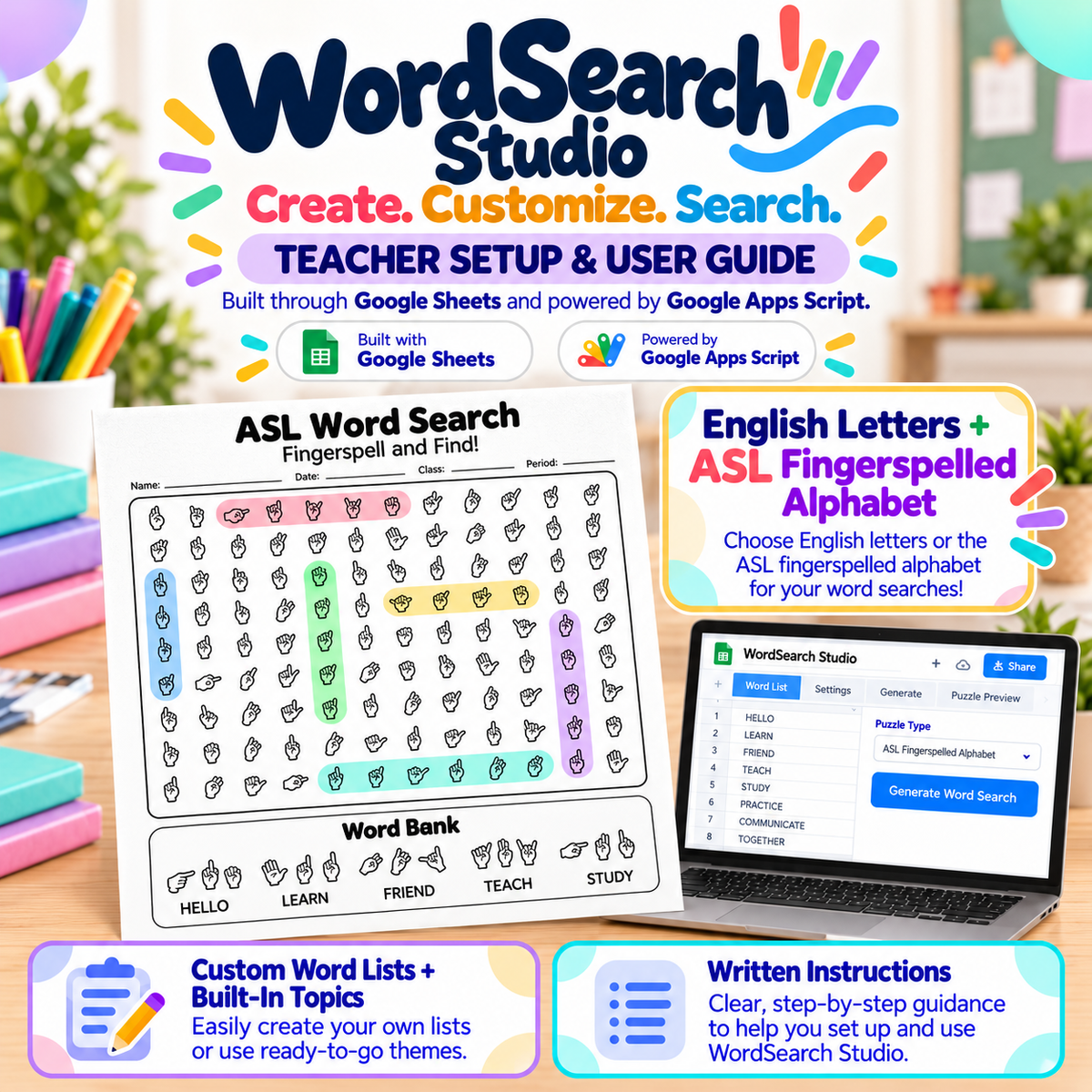
WordSearch Studio is a customizable word-search generator designed by a teacher, for teachers. Create personalized, classroom-ready puzzles using your own vocabulary, built-in word collections, or reusable word banks—all with the flexibility to adjust difficulty, appearance, layout, and more.
And this isn't your ordinary word-search generator! WordSearch Studio offers five different letter display options, including American Sign Language (ASL) fingerspelling and two visual Braille formats, making it a versatile resource for language instruction, visual recognition, vocabulary practice, and classroom activities.
Five Ways to Display Your Puzzles
Choose from five unique display options:
-
UPPERCASE English: Traditional capital letters
-
lowercase English: Practice recognizing lowercase letters
-
ASL Fingerspelling: Replace letters with illustrated ASL manual alphabet handshapes
-
Braille — Full Cell: Display all six positions of each Braille cell, including used and unused dot positions
-
Braille — Dots Only: Display just the Braille dot patterns without the unused cell positions
Mix and match! Independently choose how letters appear in the puzzle grid and the word bank.
For example, create an ASL fingerspelling puzzle with an English word bank, a lowercase English puzzle with uppercase clues, or a Braille recognition activity with a traditional letter word bank.
You can also choose whether to show or remove accents when applicable.
Create Your Own Word Searches
Use your own vocabulary. Type words directly, paste lists from documents, or copy vocabulary from spreadsheets. WordSearch Studio even recognizes CSV-formatted lists and converts them for you.
Generate words by topic. Choose from built-in categories and subcategories, then select how many words to randomly generate from your chosen collection.
Build reusable word banks. Save your favorite vocabulary lists for future lessons, edit them whenever needed, and organize your collections through the connected Google Sheet.
Combine word sources. Mix your own vocabulary with saved lists and built-in topic collections to create exactly the activity you want.
Customize the Difficulty
Create everything from beginner-friendly puzzles to challenging word searches with hidden words going in multiple directions.
Choose from:
-
Easy: Horizontal and vertical words
-
Medium: Adds diagonal words
-
Hard: Adds backward words
-
Custom: Select exactly which word directions you want to allow
You also control the puzzle size! Let WordSearch Studio automatically determine an appropriate grid size or manually set the number of rows and columns.
Make Every Worksheet Your Own
Customize the finished worksheet with:
-
Your own title and subtitle
-
Optional student information fields
-
Editable labels for Name, Date, Class, Period, Teacher, and custom fields
-
Adjustable grid size and word directions
-
Separate display settings for the puzzle and word bank
-
Multiple layout and page-formatting options
Save Time With Built-In Teacher Tools
Automatically generated answer keys
Every puzzle comes with a matching teacher answer key. No more solving your own puzzles before handing them out!
One-click scrambling
Love your vocabulary and settings but need a different version? Scramble your puzzle to generate a new arrangement without starting over. Great for multiple class periods, differentiated activities, or reducing answer sharing.
Save and reopen puzzles
Save completed puzzles with their word lists and settings intact. Return to them later without rebuilding your work.
Print or save as PDF
Create classroom-ready worksheets and answer keys that can be printed directly or saved as PDF files.
Built-in word safety filtering
WordSearch Studio checks randomly generated filler letters against a customizable blocked-word list to help prevent inappropriate or unwanted words from appearing accidentally. Add permanent blocked words to your Google Sheet or temporarily block specific words for individual puzzles.
Your Resources Stay in Your Google Drive
WordSearch Studio is built using Google Sheets and Google Apps Script.
Rather than relying on a separate database controlled by ASL Study Hall, your saved vocabulary lists, puzzles, and app information are stored in your own Google Sheet in your Google Drive.
This gives you direct ownership and control of your saved resources.
After a one-time setup, WordSearch Studio runs as a convenient browser-based web app. Bookmark your personalized URL and return whenever you need to create another activity.
No coding experience is required. The code is already included!
What's Included
-
WordSearch Studio Google Sheet with the application code
-
Browser-based word-search creation interface
-
Built-in vocabulary topic collections
-
Five letter and symbol display options
-
Puzzle customization and difficulty controls
-
Save, load, and scramble features
-
Printable student puzzles and teacher answer keys
-
Complete illustrated installation and user manual
-
Step-by-step video walkthroughs to guide you through setup and use
Perfect For
ASL classes, Braille awareness activities, spelling practice, elementary classrooms, world languages, special education, literacy instruction, vocabulary review, substitute plans, early finishers, and more.
From traditional English word searches to specialized visual-symbol recognition activities, WordSearch Studio helps you create engaging practice materials for a wide variety of learners.
Important Setup Information
WordSearch Studio is a digital product that requires a Google account, Google Sheets, and authorization of the included Google Apps Script.
A one-time setup is required to deploy your personal web app. Illustrated instructions and video walkthroughs are included to guide you through the process.
The ASL manual alphabet font is included for use within WordSearch Studio. Installing that font separately on your computer for use in other programs requires a separate purchase.
Important Note About Braille
WordSearch Studio's Braille puzzles are designed for sighted individuals learning to visually recognize Grade 1 Braille characters. They are not intended to function as accessible, tactile Braille materials for blind readers.
The Braille characters are printed using ordinary ink and will not have raised bumps—because, well… it's paper and ink! Actual tactile Braille requires embossing or another method that produces raised dots.
Create more. Customize everything. Search differently.
WordSearch Studio — an original classroom resource from ASL Study Hall.
Share